In this chapter we construct a fully parametric spur gear in SolidWorks, driven entirely by equations. The tooth profile follows a true involute curve, and the model rebuilds correctly for any number of teeth \(N\) and any module \(m\) without manual intervention. The idea is to define a single equation-driven curve that smoothly combines the radial line segment (below the base circle) with the involute (above it), so that the sketch topology remains identical regardless of parameter values.
We proceed in four stages. First, we review the geometry of the involute and the standard circles that define a gear tooth. Second, we set up the global variables and derive all dependent quantities, including the root fillet radius. Third, we define the unified parametric curve and build the half-tooth sketch. Finally, we use extrude, mirror, and circular pattern to produce the complete gear.
Gear Geometry and the Involute Curve
The involute of a circle is the curve traced by the endpoint of a taut string as it unwinds from a cylinder of radius \(r\). This curve has a remarkable property: the normal at every point passes through the tangent point on the base circle, which means that two involute gears in mesh transmit a constant angular velocity ratio regardless of small variations in centre distance. This is why the involute profile has been the standard for gear teeth since the 19th century.
where \(r\) is the base circle radius and \(\alpha\) is the unwinding angle measured from the point where the string leaves the circle. At \(\alpha = 0\) the curve starts on the base circle itself (the cusp), and as \(\alpha\) increases the curve spirals outward.
A spur gear is defined by four concentric circles:
The pitch circle of radius \(r_p = mN/2\), where \(m\) is the module and \(N\) the number of teeth. Two meshing gears contact at their pitch circles.
The base circle of radius \(r_b = r_p \cos\varphi\), where \(\varphi\) is the pressure angle (typically 20°). The involute unwinds from this circle.
The tip (addendum) circle of radius \(r_a = m(N+2)/2\), marking the outermost extent of the tooth.
The root (dedendum) circle of radius \(r_f = r_p - 1.25\,m\), defining the bottom of the tooth space.
The relationship between these circles determines the tooth geometry. For small \(N\) the root circle lies below the base circle, meaning the involute does not extend all the way down to the root. For large \(N\) (roughly \(N > 33\) at standard pressure angle) the root circle lies above the base circle, and the involute alone covers the full flank. This distinction will motivate the unified curve we develop in a later section.
Visualizing the involute
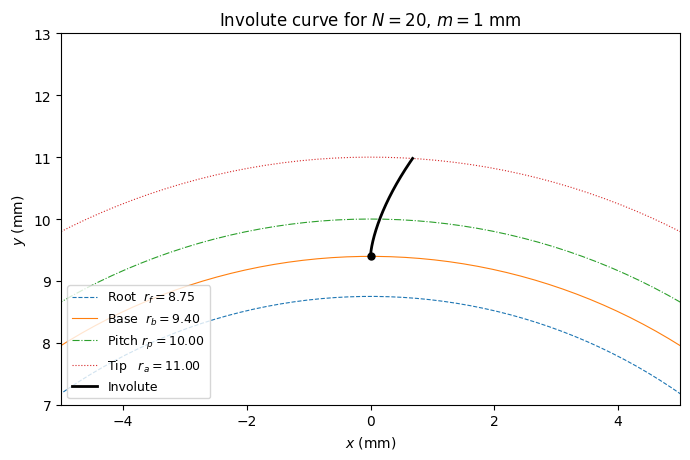
We plot the involute for a gear with \(N = 20\) and \(m = 1\,\text{mm}\), together with the four reference circles. The involute starts at the base circle and spirals outward; we draw it from \(\alpha = 0\) to the value of \(\alpha\) where it crosses the tip circle.
import numpy as npimport matplotlib.pyplot as plt# Gear parametersN =20# Number of teethm =1# Module (mm)pressure_angle = np.radians(20) # Pressure anglepitch_radius = m * N /2base_radius = pitch_radius * np.cos(pressure_angle)tip_radius = m * (N +2) /2root_radius = pitch_radius -1.25* m# Involute parameter at tip circle: solve |involute(alpha)| = tip_radius# From the involute, the radial distance is r*sqrt(1 + alpha^2),# so alpha_tip = sqrt((tip_radius/base_radius)^2 - 1)alpha_tip = np.sqrt((tip_radius / base_radius)**2-1)# Involute curvealpha = np.linspace(0, alpha_tip, 300)x_inv = base_radius * (np.sin(alpha) - alpha * np.cos(alpha))y_inv = base_radius * (np.cos(alpha) + alpha * np.sin(alpha))# Reference circlestheta = np.linspace(0, 2* np.pi, 500)fig, ax = plt.subplots(1, 1, figsize=(7, 7))ax.set_aspect('equal')for radius, label, ls in [ (root_radius, f'Root $r_f = {root_radius:.2f}$', '--'), (base_radius, f'Base $r_b = {base_radius:.2f}$', '-'), (pitch_radius, f'Pitch $r_p = {pitch_radius:.2f}$', '-.'), (tip_radius, f'Tip $r_a = {tip_radius:.2f}$', ':'),]: ax.plot(radius * np.cos(theta), radius * np.sin(theta), ls=ls, lw=0.8, label=label)ax.plot(x_inv, y_inv, 'k-', lw=2, label='Involute')ax.plot(x_inv[0], y_inv[0], 'ko', ms=5) # cusp at base circleax.set_title(f'Involute curve for $N={N}$, $m={m}$ mm')ax.legend(loc='lower left', fontsize=9)ax.set_xlabel('$x$ (mm)')ax.set_ylabel('$y$ (mm)')ax.set_xlim( -5*m, 5*m)ax.set_ylim( pitch_radius -3*m, pitch_radius +3*m)plt.tight_layout()plt.show()
SolidWorks Global Variables
All dimensions in the gear model are controlled through global variables defined in the SolidWorks equation manager. The following table lists each variable, its expression, and its meaning.
Variable
Expression
Description
N
20
Number of teeth
m
1
Module (mm)
PressureAngle
20
Pressure angle (degrees)
PitchRadius
"m" * "N" / 2
Pitch circle radius
BR
"PitchRadius" * cos("PressureAngle")
Base circle radius
TipRadius
"m" * ("N" + 2) / 2
Tip (addendum) radius
RootRadius
"PitchRadius" - 1.25 * "m"
Root radius (standard dedendum)
t_tip
sqr(("TipRadius" / "BR") ^ 2 - 1)
Involute parameter at tip circle
MidAngle
360 / ("N" * 4)
Half the angular pitch (degrees)
R_fillet
(see derivation below)
Root fillet radius
Note that SolidWorks interprets cos("PressureAngle") correctly when PressureAngle is defined as a dimensionless number and the trig functions expect degrees. The variable t_tip gives the value of the involute parameter \(\alpha\) at the tip circle, computed from \(\alpha_{\text{tip}} = \sqrt{(r_a/r_b)^2 - 1}\).
Root Fillet Radius
Derivation
At the base circle, the space between two adjacent tooth flanks has a half-width given by
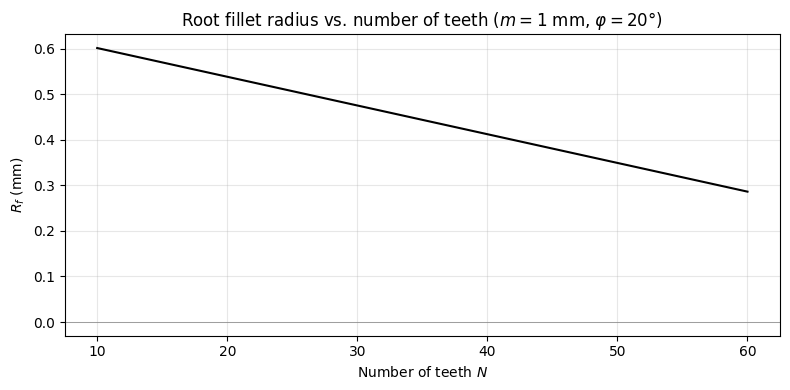
where \(\operatorname{inv}(\varphi) = \tan\varphi - \varphi\) is the involute function evaluated at the pressure angle (in radians). A fillet arc that fills a fraction \(k\) of this half-space (with \(k < 1\), e.g. \(k = 0.9\)) has radius
Important: Do not store \(\operatorname{inv}(\varphi)\) as a separate global variable. SolidWorks may assign it angular units (degrees), making it unusable in length expressions. By embedding the involute function directly in the fillet equation, the multiplication with BR (mm) forces the result into millimetres.
# Fillet radius as a function of NN_range = np.arange(10, 61)pitch_radii = m * N_range /2base_radii = pitch_radii * np.cos(pressure_angle)inv_phi = np.tan(pressure_angle) - pressure_angle # involute functionR_fillet =0.9* base_radii * (np.pi / (2* N_range) - inv_phi)fig, ax = plt.subplots(figsize=(8, 4))ax.plot(N_range, R_fillet, 'k-', lw=1.5)ax.axhline(0, color='gray', lw=0.5)ax.set_xlabel('Number of teeth $N$')ax.set_ylabel('$R_f$ (mm)')ax.set_title('Root fillet radius vs. number of teeth ($m = 1$ mm, $\\varphi = 20°$)')ax.grid(True, alpha=0.3)plt.tight_layout()plt.show()
The Unified Curve: Root to Tip
The problem
For a standard 20° pressure angle gear, the root circle falls below the base circle when \(N\) is small (roughly \(N < 34\)). In that case, the involute does not reach down to the root, and a straight radial line must bridge the gap between the root and base circles. For larger \(N\), the root circle lies above the base circle, the involute extends past the root, and this radial segment vanishes. If we draw the radial line and involute as separate sketch entities, the sketch topology changes when \(N\) crosses this threshold: the radial line disappears, any fillet referencing it breaks, and the model fails to rebuild.
The solution
We define one equation-driven curve that smoothly combines the radial line and the involute into a single entity. The parameter \(t\) runs from \(-1\) to \(1\). Internally, we define \(v = t \cdot t_{\text{tip}}\) (where \(t_{\text{tip}}\) is the involute parameter at the tip circle). When \(v \geq 0\) the involute trigonometric functions are active; when \(v < 0\) a straight radial line extends below the base circle. The curve always starts well below any possible root circle and always ends at the tip, regardless of \(N\).
Algebraic max and min without IF statements
SolidWorks equation-driven curves do not support IF, IIF, or max. We use the identity
The first terms are the standard involute evaluated at \(v^+\). When \(v < 0\), we have \(v^+ = 0\) and the involute terms reduce to \((0, r_b)\), i.e. the cusp point on the base circle. The \(v^- \cdot r_b\) term then adds a downward radial offset from the cusp, producing a straight line along the \(y\)-axis below the base circle. When \(v \geq 0\), we have \(v^- = 0\) and the curve is the involute.
\(t\) range
\(v^+\)
\(v^-\)
Curve behaviour
\(t < 0\)
\(0\)
\(v\)
Straight radial line below base circle
\(t = 0\)
\(0\)
\(0\)
Point at \((0, r_b)\): involute cusp
\(t > 0\)
\(v\)
\(0\)
Standard involute up to tip
SolidWorks equation-driven curve
Set the parameter range to \(t_1 = -1\), \(t_2 = 1\) and enter:
The curve is one continuous entity from well below the root to the tip. The topology never changes.
Visualizing the unified curve
We plot the unified curve for several values of \(N\) to illustrate how it handles both small and large tooth counts. For each case, the root circle is shown as a dashed arc. When the root circle lies below the base circle, the straight-line portion of the curve is visible; when it lies above, the curve is purely involute down to the root.
Before sketching the tooth profile, create four construction circles at RootRadius, BR, PitchRadius, and TipRadius. These serve as visual references and provide intersection points for trimming. Next, draw a reference line from the centre of the gear to the point where the involute crosses the pitch circle. Finally, define a midline reference: the variable MidAngle = 360 / (N * 4) gives the angular half-width of one tooth space at the pitch circle. Create a reference plane through the gear axis, rotated by MidAngle from the reference line. This plane will serve as the mirror plane when completing the full tooth space.
The three sketch entities
The half-tooth-space sketch always consists of exactly three entities:
The unified curve defined above, with parameter range \(t_1 = -1\), \(t_2 = 1\).
A root arc drawn as a centerpoint arc at radius RootRadius.
A midline closure along the tooth space midline, connecting the root arc to the tip circle (or back to the centre).
Trimming and filleting
Trim the unified curve below the root arc and trim the root arc beyond the midline. The result is a clean half-tooth-space profile forming a closed loop. At the corner where the trimmed curve meets the root arc, apply a sketch fillet with radius R_fillet. This corner always exists because the curve and root arc are always present as two distinct entities meeting at one point, regardless of the value of \(N\).
3D Operations
With the half-tooth-space sketch complete, the 3D model follows in three steps.
First, extrude-cut the half-tooth profile through the gear blank (a cylinder of radius TipRadius and appropriate face width). Use “Through All” or a specified depth as needed.
Second, mirror the extrude-cut feature about the midline reference plane. This produces one complete tooth space.
Third, apply a circular pattern of the mirrored feature around the gear axis with N instances. The result is the finished spur gear with all \(N\) tooth spaces cut.
Complete Gear Profile
We can reproduce the full gear outline in Python by applying the same mirror-and-rotate logic. For each of the \(N\) teeth, we mirror the involute flank about the tooth midline and rotate the resulting tooth space by \(2\pi k / N\).
This approach is fully parametric and robust for any combination of \(N\) and \(m\). When \(N\) is small and the root circle lies below the base circle, the unified curve’s radial-line portion bridges the gap, and trimming at the root circle produces the correct profile. When \(N\) is large and the root circle lies above the base circle, the involute portion extends past the root, and the same trimming operation removes the excess. In both cases the sketch contains exactly the same entities: one trimmed curve, one root arc, one midline closure, and one fillet. No IF statements appear in the parametric curve, the parameter bounds are always \(t \in [-1, 1]\), and the fillet always has two real edges to work with.
Change N and m freely. The model rebuilds without errors.