10.15 Phone control over Wi-Fi
This chapter puts the car together. The steering servo, the motor driver and the battery monitor each got a chapter and a code module of their own. Here we add a fourth module that turns the ESP32 into a Wi-Fi access point, serves a small web page with two touch pads to any phone that connects, and passes the pad positions to the other modules. The phone also gets the battery voltage, the motor state and the motor current back twice a second. Nothing has to be installed on the phone: the browser is the remote control.
The guide comes first and ends with the car driving on the floor. The explanations follow after it: how the phone and the car talk, how often each part of the firmware runs, what happens when the link breaks, and why Wi-Fi and the motor make demands on the rest of the car.
From the moment the access point is up, anyone with the password can drive the car. Make every first run with the wheels off the ground, keep the main switch within reach, and change the password from the default before the car leaves the bench.
The Guide
The car must be complete before this guide starts: the power chain of Lithium polymer batteries, the buck converter set to 7.0 V as in Buck converters, the servo wired and calibrated as in Hobby servos, the BTS7960 wired as in Driving a DC motor with the BTS7960, and the battery divider on GPIO 34 calibrated as in Voltage dividers. Each of those chapters tested its part alone, and that is the order in which faults are found most easily.
Step 1: Create the project
Create a PlatformIO project named car as in the PlatformIO chapter. The finished project is in code/car next to this chapter. It has ten source files in src/:
| File | From | Chapter |
|---|---|---|
servo_control.h |
code/servo/src/ |
Hobby servos |
motor_control.h, motor_control.cpp |
code/motor/src/ |
BTS7960 |
battery.h, battery.cpp |
code/battery/src/ |
Voltage dividers |
web_control.h, web_control.cpp, web_page.h |
new | this chapter |
main.cpp |
new | this chapter |
Copy the five module files unchanged from the projects of the earlier chapters. They read everything that differs between cars, the pins and the calibration, from build flags, so they need no edits. The four new files are listed in The code.
Step 2: Write platformio.ini and name the car
Replace platformio.ini with the file below. It collects the build flags of the three earlier projects and adds the ones for Wi-Fi and the link.
[env:esp32dev]
platform = espressif32@6.13.0
board = esp32dev
framework = arduino

upload_speed = 921600
monitor_speed = 115200
monitor_echo = yes
monitor_filters = send_on_enter, esp32_exception_decoder

lib_deps =
    ESP32Async/ESPAsyncWebServer@^3.6.0
    ESP32Async/AsyncTCP@^3.3.0

build_flags =
    -D BAUD=${this.monitor_speed}
    ; Wi-Fi access point: give every car its own SSID
    -D AP_SSID=\"RC-Car-01\"
    -D AP_PASSWORD=\"mekatronik\"
    -D AP_CHANNEL=1
    ; control link: no joystick message for this long -> coast, centre steering
    -D LINK_TIMEOUT_MS=500
    -D TELEMETRY_MS=500
    -D LOOP_MS=20
    ; throttle scale while the battery is in WARN
    -D WARN_THROTTLE_SCALE=0.5f
    ; servo (Servo chapter): pin, LEDC channel, 50 Hz frame, 16-bit duty
    -D SERVO_PIN=13
    -D SERVO_CH=0
    -D SERVO_FREQ_HZ=50
    -D SERVO_RES_BITS=16
    ; steering end points in microseconds (put in your calibrated values)
    -D SERVO_LEFT_US=1000
    -D SERVO_CENTER_US=1500
    -D SERVO_RIGHT_US=2000
    -D SERVO_MIN_US=500
    -D SERVO_MAX_US=2500
    ; BTS7960 (BTS7960 chapter): pins, LEDC channels 4 and 5, 20 kHz, 8 bit
    -D MOTOR_RPWM_PIN=16
    -D MOTOR_LPWM_PIN=17
    -D MOTOR_EN_PIN=19
    -D MOTOR_IS_R_PIN=36
    -D MOTOR_IS_L_PIN=39
    -D MOTOR_RPWM_CH=4
    -D MOTOR_LPWM_CH=5
    -D MOTOR_PWM_HZ=20000
    -D MOTOR_PWM_BITS=8
    -D MOTOR_RAMP_PER_S=2.0f
    -D MOTOR_K_ILIS=8500.0f
    -D MOTOR_IS_R_BOARD_OHM=10000.0f
    -D MOTOR_IS_R_EXT_OHM=390.0f
    -D THROTTLE_DEADBAND=0.08f
    -D REVERSE_ARM_MS=300
    ; battery monitor (Voltage divider chapter)
    -D BATT_PIN=34
    ;-D BATT_ADC_LO=2597
    ;-D BATT_V_LO=9.0
    ;-D BATT_ADC_HI=3636
    ;-D BATT_V_HI=12.6
    -D BATT_WARN_V=9.9
    -D BATT_CUTOFF_V=9.6
    -D BATT_RECOVER_V=10.2
    -D BATT_CUTOFF_LATCH=1
Three groups of lines must be changed for every car. First the name of the network: with twenty cars in a room, each needs its own AP_SSID, e.g. the group number, RC-Car-07. The quotes around the name are escaped with backslashes, because the flag must reach the compiler as a string in quotes. The password must have at least 8 characters, or the access point does not start. Second the servo end points SERVO_LEFT_US, SERVO_CENTER_US and SERVO_RIGHT_US from the servo calibration. Third the four battery calibration lines from the divider calibration, with the ; in front of them removed, and MOTOR_IS_R_BOARD_OHM as measured in BTS7960 Step 1.
The two libraries under lib_deps are the asynchronous web server and the TCP layer under it, both maintained by the ESP32Async organisation. PlatformIO downloads them on the first build. With the versions pinned as above, the project builds with ESPAsyncWebServer 3.12.1 and AsyncTCP 3.5.0, the newest matching versions in October 2026.
Step 3: Build and upload
Switch the car off and connect the ESP32 by USB only (see USB and VIN at the same time). Build and upload as in the PlatformIO chapter, holding BOOT while the uploader connects. Open the serial monitor and press EN. The car prints
Wi-Fi "RC-Car-07" on channel 1, open http://192.168.4.1/Step 4: Connect the phone
On the phone, open the Wi-Fi settings and join the network with the name of the car and the password from platformio.ini. The phone may warn that the network has no internet access; choose to stay connected. Open the browser and type http://192.168.4.1 in the address bar, with http:// written out, since some browsers try https:// first and the car does not answer that. The page shows two grey circles and the text connecting ..., which changes to the battery voltage within half a second. With the car on USB only, the voltage reads near zero and the state reads CUTOFF, which is correct: the divider sees no battery. The serial monitor prints phone 1 connected from 192.168.4.2.
If the page does not load, turn off mobile data on the phone and try again. Some phones send traffic over the mobile network when the Wi-Fi network has no internet.
Step 5: Drive with the wheels off the ground
Unplug the USB cable. Put the car on a box so that the driven wheels hang free, and switch the main switch on. The ESP32 starts from the buck converter; reconnect the phone if it lost the network, and reload the page. The battery voltage should now agree with a multimeter on the rail within about 0.1 V, and the state reads OK.
The left pad steers: put a thumb on it and slide sideways, and the front wheels follow. The right pad is the throttle: slide up and the wheels turn forward, and the telemetry line shows FORWARD with a duty that rises over half a second to the pad position. Lift the thumb and the pad returns to the middle; the motor coasts. Pull the throttle down while the wheels turn forward: the state becomes BRAKE. Release, wait half a second, and pull down again: REVERSE. This is the throttle logic of the BTS7960 chapter, unchanged.
Now test the failsafe. Hold the throttle at a quarter and, with the other hand, turn off Wi-Fi on the phone (or lock the screen). Within half a second the motor coasts and the steering returns to the centre, and the serial monitor (if connected) shows phone 1 disconnected a little later. Turn Wi-Fi back on and reload the page: the car responds again. Do not drive on the floor before this test has passed.
Step 6: Drive on the floor
Put the car on the floor in an open space and start slowly. The range indoors is typically some tens of metres, less through walls; the link gets jerky before it fails, and the failsafe stops the car when it does. Watch the battery line on the page: below 9.9 V it turns yellow (WARN) and the throttle is halved, and once it has stayed below 9.6 V for one second it turns red (CUTOFF) and the motor stops. The cutoff holds until the car is switched off, since BATT_CUTOFF_LATCH=1. Charge the battery before driving again.
Troubleshooting
The network does not appear on the phone
Check the serial monitor. softAP failed means the password is shorter than 8 characters. If the ESP32 restarts over and over with Brownout detector was triggered, its supply is too weak; see Brown-out.
The page loads but shows no link
The WebSocket could not connect, or it was closed. Reload the page. If two phones are connected, both see telemetry but only the first one that sends drives the car; close the page on the other one.
The car stutters or stops every few seconds while driving
The link drops messages for longer than LINK_TIMEOUT_MS. Stay closer, or move the car to another Wi-Fi channel (AP_CHANNEL 6 or 11) if many cars in the room share channel 1.
The car stops when the motor starts, and the page loses the link
The ESP32 restarted. See Brown-out.
How It Works
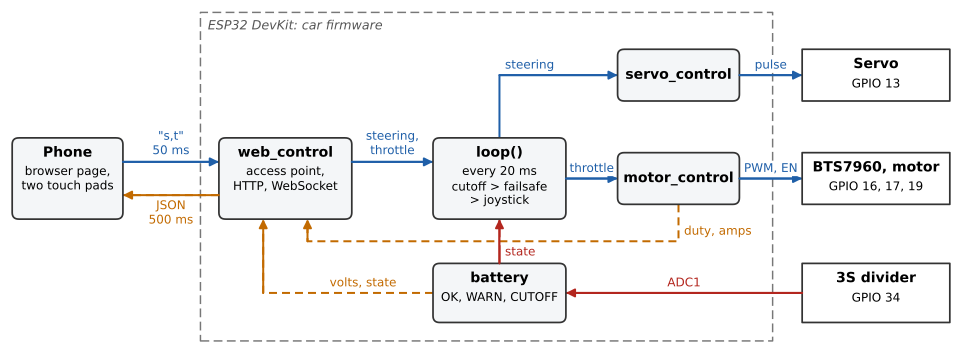
Figure 10.15.1 shows the parts of the firmware and what flows between them. The phone sends the two pad positions to web_control over Wi-Fi. The loop in main.cpp reads them, applies the battery state and the failsafe, and hands steering to servo_control and throttle to motor_control. Telemetry goes the other way: web_control reads the battery and motor modules and sends the values to the phone.
Access point and station
A Wi-Fi device works either as a station, which joins an existing network, or as an access point, which is the network. A phone at home is a station and the home router is the access point. The ESP32 can be either. As a station it would join the school network, get an address from it, and the phone would have to find that address and be on the same network. In a lab with twenty cars and a guest network that blocks traffic between devices, that is fragile.
As an access point (WiFi.mode(WIFI_AP) and WiFi.softAP(...)), the car is the network. The ESP32 takes the address 192.168.4.1 and hands out 192.168.4.2 and up to the phones that join, so the address of the car is the same on every car and every day. The Arduino core allows four phones at a time by default, more than one car needs. The price is that a phone connected to the car has no internet over Wi-Fi.
HTTP and WebSocket
The browser fetches the page with an ordinary HTTP request: it opens a TCP connection to port 80, sends GET /, receives the page and the connection ends. HTTP is made for this pattern of one question and one answer. It suits a control link poorly. Sending the pad position twenty times a second as twenty HTTP requests would mean twenty connections, each with a few hundred bytes of headers, and the car could never send anything to the phone that the phone had not asked for.
A WebSocket starts as an HTTP request to /ws that asks the server to upgrade the connection. After the upgrade the TCP connection stays open, and both ends may send short messages at any time. A message from the browser carries a header of 2 bytes and a 4-byte mask key, so the pad message -35,80 travels as 12 bytes. The car can push telemetry to the phone without being asked. TCP still delivers every message in order and resends lost packets, which has a consequence for control: a message that was lost is resent late instead of being dropped, and the newer messages wait behind it. On a good link this is invisible; on a bad link it shows up as a stutter, and the failsafe below is what keeps the car safe through it.
The message format
The phone sends one text message every 50 ms, two integers separated by a comma:
s,twhere s is the steering and t the throttle, both from \(-100\) to \(100\) in percent of full travel. Positive steering is to the right and positive throttle is forward. 0,0 is the pad at rest, and -35,80 is 35 % left and 80 % throttle. The car divides by 100 to get the \(-1\) to \(1\) range that setSteering() and throttleUpdate() take.
The phone sends the message also when nothing has changed. The stream itself is the sign that the link is alive: the car does not have to tell a phone that holds the throttle still apart from a phone that has disappeared, because the first sends and the second does not.
The car sends telemetry every TELEMETRY_MS (500 ms) to every connected phone, as one JSON object:
{"volts":11.84,"batt":"OK","motor":"FORWARD","duty":0.42,"amps":3.1}volts is the filtered battery voltage, batt the battery state (OK, WARN or CUTOFF), motor the state of the bridge (COAST, FORWARD, REVERSE or BRAKE), duty the signed duty cycle from \(-1\) to \(1\), and amps the current through the bridge from the IS pins of the BTS7960. JSON costs a few more bytes than a list of numbers, but the browser decodes it with one call (JSON.parse), and a field added later does not break a page that does not know it.
On the car, onMessage() copies the received bytes into a buffer of 16 characters, adds the terminating zero inside the buffer, and reads the two numbers with sscanf. A message of 16 bytes or more is ignored, since it cannot be ours. The copy matters: the library hands over a pointer to the received data and its length, and writing a zero at data[len], one byte after the end, writes outside the buffer the library gave us. Recent versions of the library reserve that byte for us, but the code should not depend on it. Values outside \(-100\) to \(100\) are clamped.
Who runs when
Three pieces of code run at different rates. The page in the phone’s browser sends a message every 50 ms. On the ESP32, the Wi-Fi driver runs on core 0, and the AsyncTCP library runs a separate task that calls onEvent() whenever a message arrives. onMessage() stores the new command and the time it arrived, and returns. It does not touch the motor or the servo. The Arduino loop() runs on core 1, a little slower than every 20 ms (LOOP_MS), and does everything else:
| Every | Who | What |
|---|---|---|
| 50 ms | phone | sends s,t |
| when a message arrives | AsyncTCP task | onMessage() stores the command and its time |
| 20 ms | loop() |
battery reading, priorities, setSteering(), throttleUpdate() |
| 500 ms | loop() via webUpdate() |
telemetry to the phone, removes dead clients |
Because the network task writes the command and loop() reads it, possibly at the same instant on two cores, the three shared values (steering, throttle, time) are read and written inside a critical section (portENTER_CRITICAL/portEXIT_CRITICAL with a spinlock). Without it, loop() could read the new steering together with the old time. In this program that would be harmless, but the habit is cheap and the bugs it prevents are rare and very hard to find.
The loop period sets the timing of the other modules. The servo receives a new pulse width every 20 ms, the same as its 50 Hz frame, so it never gets a value it cannot use. The soft start of motorDrive() lets the duty rise by MOTOR_RAMP_PER_S = 2 per second, i.e. by \(2 \cdot 0.020 = 0.04\) per pass, and reaches full throttle in 0.5 s. batteryUpdate() takes a reading at most every 10 ms, so with a 20 ms loop it reads once per pass, and its filter of 32 readings gets a time constant of about \(32 \cdot 20~\text{ms} = 0.64\) s instead of the 0.32 s of the battery chapter. That is still well below the 1 s that a low voltage must last before the state changes.
The worst-case reaction to a lost phone is the link timeout plus one loop period, \(500 + 20 = 520\) ms. A car moving at 3 m/s rolls \(3 \cdot 0.52 = 1.6\) m in that time, and then coasts. The timeout is a compromise. Shorter would stop the car on every small hiccup of the Wi-Fi link, since ten messages in a row must be lost before 500 ms pass. Longer would let the car run further without a driver.
Failsafe and priorities
Three sources decide what the motor does, and loop() checks them in a fixed order:
DriveCommand cmd;
webCommand(cmd);  // zero command if the link is lost
BattState batt = batteryState();
if (batt == BATT_CUTOFF) cmd.throttle = 0.0f;
else if (batt == BATT_WARN) cmd.throttle *= WARN_THROTTLE_SCALE;
The phone’s command is the starting point. webCommand() replaces it by zero steering and zero throttle when no message has arrived for LINK_TIMEOUT_MS, or when the phone that drives has closed the connection; that is the failsafe. The battery state is applied last and wins over both: in CUTOFF the throttle is zero whatever the phone sends, and in WARN it is halved so that the driver notices and drives home. The priority is therefore cutoff before failsafe before joystick. Zero throttle into throttleUpdate() means coast, so a lost link or an empty battery lets the car roll out freely. A brake would stop it shorter, but a car braking hard at full speed can skid, and on a lost link nobody is steering.
Steering is centred on a lost link, so the car rolls out straight, but it is kept under CUTOFF, so the driver can steer the coasting car away from an obstacle.
When two phones are connected, the first to send a message becomes the driver, and messages from the other are ignored. If the driver goes silent for LINK_TIMEOUT_MS, the next phone that sends takes over. Both phones receive the telemetry.
Wi-Fi and the analog inputs
The ESP32 has two analog-to-digital converters, and the second one, ADC2, is used by the Wi-Fi driver. While Wi-Fi is on, analogRead() on an ADC2 pin fails, as described in The ESP32 ADC. This is why the pin map puts every analog input of the car on ADC1: the battery divider on GPIO 34 and the current sense of the BTS7960 on GPIO 36 and 39. A divider moved to e.g. GPIO 25 would work on the bench in a program without Wi-Fi, and read nonsense in the car.
Brown-out when the motor starts
The ESP32 watches its 3.3 V supply. If it falls below the brown-out level, about 2.4 V in the default configuration, the chip resets and prints Brownout detector was triggered on the serial port. In the car, this happens when the rail sags so far that the buck converter and the regulator on the DevKit can no longer hold their outputs. The 7.0 V from the buck needs about 7.3 V at its input (When the input sags: dropout), and a motor started at full duty from standstill draws its stall current, which pulls a nearly empty pack below that.
Wi-Fi adds to this from the other side: the ESP32 draws about 240 mA in short bursts while it transmits, more than a program without the radio ever does. A supply that only just held up during the BTS7960 tests can fail once the access point is running. The soft start of the BTS7960 chapter is the main protection: the motor reaches full duty over 0.5 s instead of at once, and the battery current stays far below the stall current while the motor speeds up. The other protections are in the hardware: short and thick battery wires, a charged pack, and the bulk capacitor at the servo.
After a reset the car comes up safe. motorBegin() puts the bridge in coast before anything else, the servo is centred, and nothing drives until a phone has reconnected and sends a message. One consequence: the cutoff latch is cleared by a restart. A brown-out during a start from a nearly empty pack may therefore bring the car back with the state OK, if the voltage at rest has recovered above 9.6 V. The next hard start will then end in CUTOFF again, after one second below the threshold.
One chapter per module
main.cpp contains no pin numbers, no PWM setup, no ADC code and nothing about Wi-Fi. It starts the four modules and calls them in the right order:
| Module | Interface used by main.cpp |
Chapter |
|---|---|---|
servo_control.h |
servoBegin(), setSteering(s) |
Hobby servos |
motor_control |
motorBegin(), throttleUpdate(t, now) |
BTS7960 |
battery |
batteryBegin(), batteryUpdate(), batteryState() |
Voltage dividers |
web_control |
webBegin(), webCommand(cmd), webUpdate(now) |
this chapter |
Each module was tested on the bench in the chapter that introduced it, with a main.cpp made for testing it, and was copied into this project unchanged. A fault in the car can therefore be traced by going back to the project of the module that misbehaves. The build flags work the same way: every module checks with #error that the flags it needs are set, so a missing line in platformio.ini stops the build with a message naming it.
Two details of the combination are new. The LEDC channels must not collide: the servo uses channel 0 at 50 Hz and the motor channels 4 and 5 at 20 kHz, on different timers. (Version 3 of the Arduino core renamed the LEDC functions to ledcAttach and ledcWrite(pin, duty), one more reason the platform version is pinned.) And web_control.cpp includes battery.h and motor_control.h to read telemetry from them, which is the only place where one module knows another.
A later chapter adds a handheld remote, a XIAO ESP32-S3 with a joystick that talks to the car over ESP-NOW on the same Wi-Fi channel 1, alongside the phone.
The code
main.cpp starts the modules and runs the loop described above.
// main.cpp: the RC car driven from a phone over Wi-Fi.
// Each module has its own chapter: servo_control (Servo), motor_control
// (BTS7960), battery (Voltage divider), web_control (this chapter).
#include <Arduino.h>
#include "servo_control.h"
#include "motor_control.h"
#include "battery.h"
#include "web_control.h"

#if !defined(BAUD) || !defined(LOOP_MS) || !defined(WARN_THROTTLE_SCALE)
#error "Set BAUD, LOOP_MS and WARN_THROTTLE_SCALE in build_flags"
#endif

void setup() {
  Serial.begin(BAUD);
  motorBegin();  // bridge in coast before anything else
  servoBegin();  // steering centred
  batteryBegin();
  webBegin();
}

void loop() {
  uint32_t now = millis();
  batteryUpdate();

  // Priorities: battery cutoff > lost link > joystick.
  DriveCommand cmd;
  webCommand(cmd);  // zero command if the link is lost
  BattState batt = batteryState();
  if (batt == BATT_CUTOFF) cmd.throttle = 0.0f;
  else if (batt == BATT_WARN) cmd.throttle *= WARN_THROTTLE_SCALE;

  setSteering(cmd.steering);
  throttleUpdate(cmd.throttle, now);  // zero throttle coasts
  webUpdate(now);
  delay(LOOP_MS);
}
web_control.h declares the interface of the new module.
// web_control.h: Wi-Fi access point, web page and WebSocket for phone control.
//
// Settings come from build_flags in platformio.ini:
//   AP_SSID, AP_PASSWORD, AP_CHANNEL   the car's own Wi-Fi network
//   LINK_TIMEOUT_MS                    silence after which the link counts as lost
//   TELEMETRY_MS                       how often telemetry goes to the phone
#pragma once
#include <Arduino.h>

struct DriveCommand {
  float steering;  // -1 full left .. +1 full right
  float throttle;  // -1 full reverse .. +1 full forward
};

// Start the access point, the web server on port 80 and the WebSocket /ws.
void webBegin();

// The latest command from the phone. Returns false, and a zero command, if no
// message has arrived for LINK_TIMEOUT_MS or no phone is connected.
bool webCommand(DriveCommand &cmd);

// Call in every pass of loop(): sends telemetry every TELEMETRY_MS.
void webUpdate(uint32_t now_ms);
web_control.cpp starts the access point, serves the page, receives the pad messages and sends telemetry. The page is sent with the length known at compile time (sizeof(WEB_PAGE) - 1), so the server sends it directly from flash without copying it into RAM.
// web_control.cpp: Wi-Fi access point, web page and WebSocket for phone control.
#include "web_control.h"
#include <WiFi.h>
#include <AsyncTCP.h>
#include <ESPAsyncWebServer.h>
#include "web_page.h"
#include "battery.h"
#include "motor_control.h"

#if !defined(AP_SSID) || !defined(AP_PASSWORD) || !defined(AP_CHANNEL) || \
    !defined(LINK_TIMEOUT_MS) || !defined(TELEMETRY_MS)
#error "Set AP_SSID, AP_PASSWORD, AP_CHANNEL, LINK_TIMEOUT_MS and TELEMETRY_MS in build_flags"
#endif

static AsyncWebServer server(80);
static AsyncWebSocket ws("/ws");

// Written by the WebSocket callback (in the network task), read by loop().
// The spinlock keeps the three values consistent with each other.
static portMUX_TYPE lock = portMUX_INITIALIZER_UNLOCKED;
static DriveCommand latest = {0.0f, 0.0f};
static uint32_t lastMsgMs = 0;
static uint32_t driverId = 0;  // client that drives; 0 = none

// One text message "s,t" with s and t from -100 to 100.
static void onMessage(AsyncWebSocketClient *client, const uint8_t *data, size_t len) {
  char text[16];
  if (len >= sizeof(text)) return;  // too long to be ours
  memcpy(text, data, len);
  text[len] = '\0';

  int s, t;
  if (sscanf(text, "%d,%d", &s, &t) != 2) return;

  portENTER_CRITICAL(&lock);
  // The first client to send drives. Another may take over once the
  // driver has been silent for LINK_TIMEOUT_MS.
  uint32_t now = millis();
  if (driverId == 0 || client->id() == driverId || now - lastMsgMs > LINK_TIMEOUT_MS) {
    driverId = client->id();
    latest.steering = constrain(s, -100, 100) / 100.0f;
    latest.throttle = constrain(t, -100, 100) / 100.0f;
    lastMsgMs = now;
  }
  portEXIT_CRITICAL(&lock);
}

static void onEvent(AsyncWebSocket *server, AsyncWebSocketClient *client,
                    AwsEventType type, void *arg, uint8_t *data, size_t len) {
  if (type == WS_EVT_CONNECT) {
    Serial.printf("phone %u connected from %s\n", client->id(),
                  client->remoteIP().toString().c_str());
  } else if (type == WS_EVT_DISCONNECT) {
    Serial.printf("phone %u disconnected\n", client->id());
    portENTER_CRITICAL(&lock);
    if (client->id() == driverId) driverId = 0;  // link lost at once
    portEXIT_CRITICAL(&lock);
  } else if (type == WS_EVT_DATA) {
    // Only complete text messages in a single frame.
    AwsFrameInfo *info = (AwsFrameInfo *)arg;
    if (info->opcode == WS_TEXT && info->final && info->index == 0 && info->len == len)
      onMessage(client, data, len);
  }
}

void webBegin() {
  WiFi.mode(WIFI_AP);
  if (!WiFi.softAP(AP_SSID, AP_PASSWORD, AP_CHANNEL))
    Serial.println("softAP failed (password shorter than 8 characters?)");
  Serial.printf("Wi-Fi \"%s\" on channel %d, open http://%s/\n", AP_SSID, AP_CHANNEL,
                WiFi.softAPIP().toString().c_str());

  ws.onEvent(onEvent);
  server.addHandler(&ws);
  server.on("/", HTTP_GET, [](AsyncWebServerRequest *request) {
    request->send(200, "text/html", (const uint8_t *)WEB_PAGE, sizeof(WEB_PAGE) - 1);
  });
  server.begin();
}

bool webCommand(DriveCommand &cmd) {
  portENTER_CRITICAL(&lock);
  bool alive = driverId != 0 && millis() - lastMsgMs <= LINK_TIMEOUT_MS;
  cmd = alive ? latest : DriveCommand{0.0f, 0.0f};
  portEXIT_CRITICAL(&lock);
  return alive;
}

void webUpdate(uint32_t now_ms) {
  static uint32_t lastSentMs = 0;
  if (now_ms - lastSentMs < TELEMETRY_MS) return;
  lastSentMs = now_ms;

  ws.cleanupClients();  // drop clients that went away without closing
  if (ws.count() == 0) return;

  char json[128];
  snprintf(json, sizeof(json),
           "{\"volts\":%.2f,\"batt\":\"%s\",\"motor\":\"%s\",\"duty\":%.2f,\"amps\":%.1f}",
           batteryVolts(), batteryStateName(batteryState()),
           motorStateName(motorState()), motorDuty(), motorCurrentA());
  ws.textAll(json);
}
web_page.h holds the page as a C++ raw string literal: everything between R"page( and )page" is taken as it stands, so the quotes and backslashes of HTML and JavaScript need no escaping. Each pad is a circle with a knob. The browser’s pointer events report touches and mouse clicks alike, and each finger has its own pointerId, so one thumb on each pad works. setPointerCapture keeps the events coming to the pad while the finger slides outside it, and the value is clamped to \(-1\) to \(1\). When the finger lifts (pointerup) or the phone cancels the touch (pointercancel, e.g. for an incoming call), the pad returns to zero. A timer sends the two values every 50 ms while the socket is open, and a closed socket is reopened after one second.
// web_page.h: the phone page, HTML + CSS + JavaScript in one raw string.
// The ESP32 sends it unchanged to every browser that opens http://192.168.4.1/.
//
// Up the WebSocket (every 50 ms while connected): "s,t" as text, two integers
// from -100 to 100, e.g. "-35,80" = 35 % left, 80 % throttle.
// Down the WebSocket (every TELEMETRY_MS): one JSON object, see web_control.cpp.
#pragma once
static const char WEB_PAGE[] = R"page(<!DOCTYPE html>
<html>
<head>
<meta charset="utf-8">
<meta name="viewport" content="width=device-width, initial-scale=1, user-scalable=no">
<title>RC car</title>
<style>
body { margin: 0; padding: 12px; font-family: sans-serif; text-align: center;
background: #222; color: #eee; user-select: none; -webkit-user-select: none; }
#telem { font-size: 1.1em; line-height: 1.6; }
.bad { color: #f55; } .warn { color: #fc3; } .ok { color: #6d6; }
.pads { display: flex; justify-content: space-around; margin-top: 16px; }
.pad { position: relative; width: 40vmin; height: 40vmin; border-radius: 50%;
background: #444; touch-action: none; }
.knob { position: absolute; left: 35%; top: 35%; width: 30%; height: 30%;
border-radius: 50%; background: #6af; pointer-events: none; }
</style>
</head>
<body>
<div id="telem">connecting ...</div>
<div class="pads">
<div class="pad" id="steer"><div class="knob"></div></div>
<div class="pad" id="throttle"><div class="knob"></div></div>
</div>
<p>left: steering right: throttle</p>
<script>
// One pad = one axis. The value is -1..1 while a finger is on the pad and
// returns to 0 when the finger is lifted. Pointer events handle touch and mouse,
// and pointerId keeps two fingers on two pads apart.
function makePad(id, axis) {
const pad = document.getElementById(id), knob = pad.firstElementChild;
let value = 0, finger = null;
function show() {
const r = pad.clientWidth * 0.35 * value;
knob.style.transform = axis === 'x' ? `translateX(${r}px)` : `translateY(${-r}px)`;
}
function move(e) {
const b = pad.getBoundingClientRect();
const v = axis === 'x' ? (e.clientX - b.left) / b.width * 2 - 1
: 1 - (e.clientY - b.top) / b.height * 2;
value = Math.max(-1, Math.min(1, v));
show();
}
function release(e) {
if (e.pointerId !== finger) return;
finger = null; value = 0; show();
}
pad.addEventListener('pointerdown', e => {
finger = e.pointerId; pad.setPointerCapture(finger); move(e);
});
pad.addEventListener('pointermove', e => { if (e.pointerId === finger) move(e); });
pad.addEventListener('pointerup', release);
pad.addEventListener('pointercancel', release);
return () => value;
}
const steer = makePad('steer', 'x');
const throttle = makePad('throttle', 'y');
const telem = document.getElementById('telem');
let ws;
function connect() {
ws = new WebSocket(`ws://${location.host}/ws`);
ws.onclose = () => { telem.innerHTML = '<span class="bad">no link</span>'; setTimeout(connect, 1000); };
ws.onmessage = e => {
const t = JSON.parse(e.data);
const cls = { OK: 'ok', WARN: 'warn', CUTOFF: 'bad' }[t.batt];
telem.innerHTML = `<span class="${cls}">${t.volts.toFixed(2)} V ${t.batt}</span><br>` +
`${t.motor} duty ${Math.round(t.duty * 100)} % ${t.amps.toFixed(1)} A`;
};
}
// Send the stick values every 50 ms, also when nothing changes: the car
// treats silence as a lost link.
setInterval(() => {
if (ws && ws.readyState === WebSocket.OPEN)
ws.send(Math.round(steer() * 100) + ',' + Math.round(throttle() * 100));
}, 50);
connect();
</script>
</body>
</html>
)page";The page has no library and no external file. A phone connected to the car has no internet, so everything the page needs must come from the car.
Exercises
Horn button. The car has no horn, but it has the LED on GPIO 2. Add a button to the page that sends the message
hwhen pressed andHwhen released, and letonMessage()switch the LED on and off. Keep thes,tmessages working, and make sure a messagehcannot be read as a pad command. What should the LED do on a lost link?Telemetry rate. Change
TELEMETRY_MSto 100 and to 2000 and drive the car. At which rate does the voltage on the page follow a hard acceleration? With 100 ms, how many bytes per second does the car send to one phone, counting the JSON and a 2-byte frame header? Compare with the bytes per second the phone sends to the car.Link latency. Measure the round trip from the phone to the car and back. Let the page send
pfollowed byperformance.now()every second, let the car send the same text back at once fromonMessage()withclient->text(...), and let the page print the difference betweenperformance.now()and the returned value. Record the round trip next to the car and at 10 and 20 m. Half the round trip plus up to 20 ms of loop period is the delay from thumb to wheel.Failsafe timing. Predict from Who runs when how long after the last message the car coasts, then measure it. Let
main.cppprintmillis()whenever the return value ofwebCommand()changes, giveweb_controla function that returns the time of the last accepted message, and print that too. Stop the messages by turning off the phone’s Wi-Fi, and again by closing the browser tab. Why do the two cases give different times?